ZapZen

Free extension for Chrome

Messages your phone can't read.

Blur names and chats on screen and protect the chats your phone shouldn't read: there, each message shows up only as “Protected message”. Free, with no account and no server.

  • Free
  • No account
  • No server

The extension’s interface is in Portuguese for now.

Privacy in two layers

What shows on screen, and what not even your phone reads.

Blurring protects the screen. Protecting the chat protects what is outside the computer: it can only be read on computers with ZapZen.

01

On screen

Hover or tap to read.

Names, photos and messages stay blurred, and only what you point at shows. To share your screen in a meeting, presentation mode blurs everything at once; and Disguise swaps photos and names for initials. Turn it on and off to see.

AS Ana SouzaDone! I'll send you the contract today 10:42
CM Carlos MendesCould it be at 3 pm? 09:58
JP Juliana PradoThanks for getting back 🙏 09:12
F FamilyMom: Sunday lunch here yesterday

02

Protected chat experimental

A chat your phone can't read.

In the chat's ⋮ menu, “Proteger conversa…” (Protect chat). If the other person also has ZapZen, the two of you agree on a key on your own; on the computer you chat normally, and on the phone, in backups and in notifications, each message shows up only as “Protected message”. Whoever doesn't have ZapZen yet gets an invitation with this page's address.

  1. You askIn the chat's ⋮ menu, “Proteger conversa…”. The request goes through the chat itself, with an invitation for whoever doesn't have ZapZen yet.
  2. The other person acceptsOn their computer, with ZapZen. Both agree on the key on their own, and it stays only on the computers.
  3. ProtectedWhat you write goes out protected, with a thin lock next to the time. Check the security code by phone.
What it protects, and what it doesn't

Protects from

  • Whoever picks up your phone
  • Phone backups (Google Drive, iCloud)
  • Notifications

Doesn't protect from

  • WhatsApp Web itself on this computer: what you type passes through its field, and what arrives shows decrypted on the page
  • Whoever uses your computer
  • What the other person replies from the phone, without ZapZen: it goes out unprotected, and is marked “sem proteção” (unprotected)
  • Photos, voice and captions: text only, up to 600 characters; and both need ZapZen on the computer

No voice messages

Voice messages? Not here.

When someone starts recording for you, or as soon as the voice message arrives, ZapZen replies on its own that you don’t listen to voice messages, with your text. And the voice messages that arrive stay hidden until you want to hear them.

  • Automatic reply
  • Hidden voice messages
  • Your own text
  • Once per person every 24 h

Only if you turn it on. On the phone, voice messages keep arriving as usual; ZapZen acts on the computer.

Colored messages

Write in color. And with a highlighter.

Select part of the text in the field and pick: color, highlighter or underline. Anyone who also has ZapZen sees the colors; everyone else reads plain text.

  • Colors
  • Highlighter
  • Underline
  • Between ZapZen users

With ZapZen

Deadline confirmed: 15 calendar days from the signature. No penalty until then!10:38

Without ZapZen

Deadline confirmed: 15 calendar days from the signature. No penalty until then!10:38

The platform

And everything your day asks for, in one place.

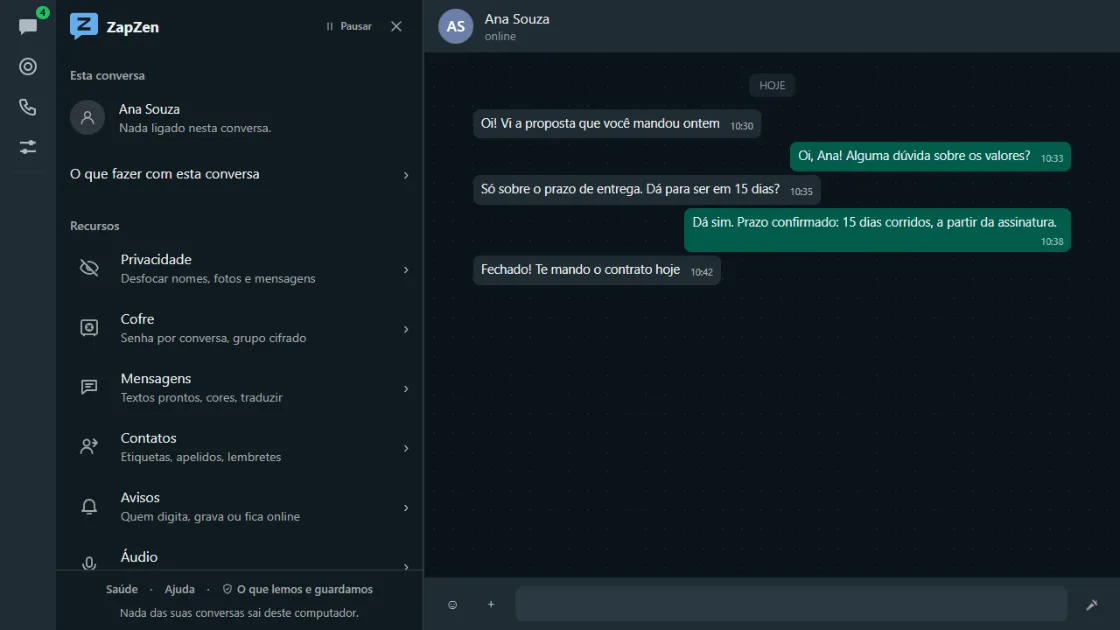
The ZapZen panel open next to a chat, with the Privacy, Vault, Messages, Contacts and Notices categories.

The panel

Nine categories, like WhatsApp's own Settings.

Privacy, Vault, Messages, Contacts, Notices, Audio, Automatic, Appearance and Data. It opens in the left column, in your WhatsApp's light or dark theme, and disappears when you close it.

  • Light and dark
  • Pause in one click
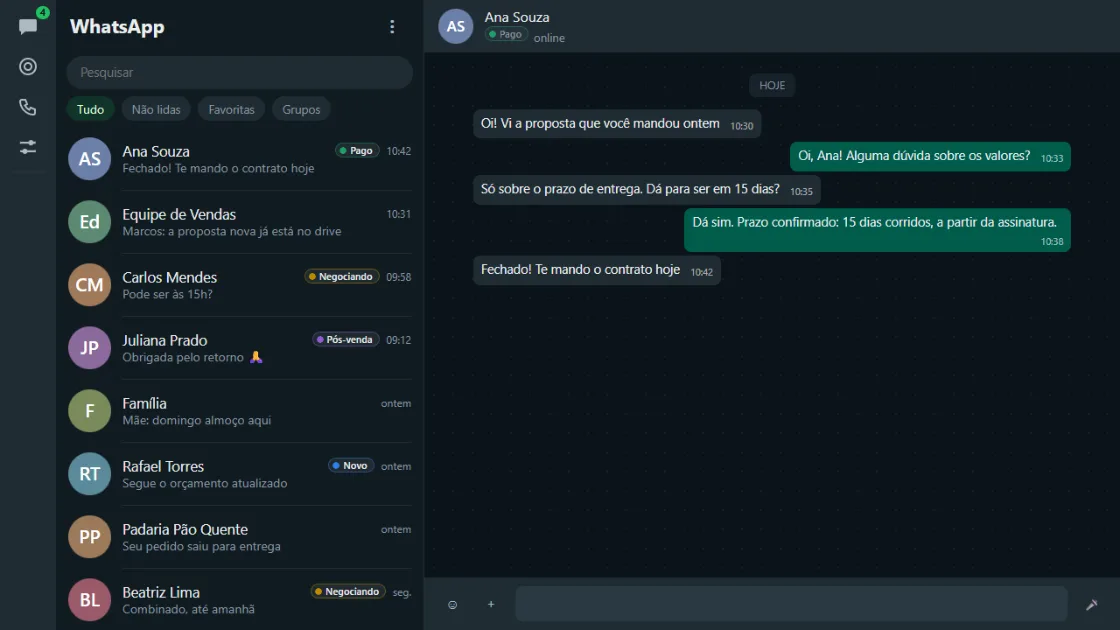
The chat list with colored labels such as Paid, Negotiating and After-sales next to the names.

Contacts

Know where each chat stands.

Colored labels in the list and at the top of the chat: New, Negotiating, Paid, After-sales, or your own. Nicknames and photos only for you, and reminders linked to the chat.

  • Labels
  • Nicknames
  • Reminders
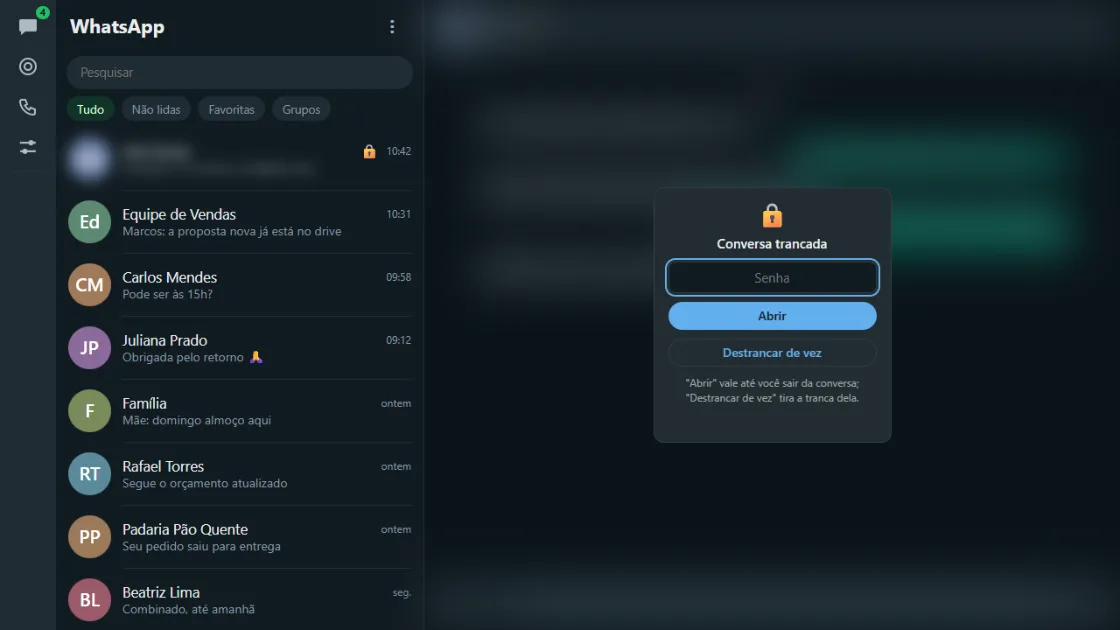
A chat locked by ZapZen, blurred, with the password prompt in the middle of the screen.

Vault

Chats that only open with your password.

Lock the chats no one else should see on this computer: they stay blurred in the list and only open with the password.

  • Password per chat
  • Only on this computer
  • Schedule a message Once or every week, at the minute you choose, even to someone you've never chatted with.
  • Clear old messages “Delete for me” on what is past the period, once a day.
  • “I can't listen to audio” When someone records for you, the ready reply in one click, or on its own.
  • Who is typing A discreet notice of who is typing, recording or online; in groups, only if you want.
  • Quick replies Type “/” in the field and pick one; {name} becomes the person's name.
  • Translate Select and translate, with Chrome itself, on this computer.
  • Disguise Photos become colored initials, and names become initials or the last digits of the number.
  • Unsaved number Open a chat by number, create a link and QR, and see what country it is from and what time it is there.

Your chats never pass through a server of ours.

ZapZen reads what is on the screen, as you do, and keeps your choices in your Chrome. What you send goes only to whom you chose, through WhatsApp itself.

Read the privacy policy
  • No server. Not to Codexsteel, who makes ZapZen, not to anyone.
  • No account. Install it and it works. No sign-up, no ads and no usage tracking.
  • No tampering with WhatsApp’s internals. ZapZen only reads and adjusts what appears on the screen, as you would.

Questions

What people usually ask.

Is it really free?

Yes. Everything is open, with no paid plan and no ads.

I got “Quero proteger esta conversa com o ZapZen” (I want to protect this chat with ZapZen). What now?

Someone wants to chat with you without the phone being able to read it. Install ZapZen in Chrome on your computer (the button at the top of this page), open WhatsApp Web and the chat with whoever asked: you'll see that they want to protect the chat, with a button to see and accept. Once you accept, both ZapZens agree on the key on their own; from then on the messages are read on the computer, and on the phone they show up only as “Protected message”.

Is the protected chat secure?

It protects from what is outside the computer: whoever picks up the phone, backups and notifications. Each message is encrypted (AES-GCM) with a key only the two computers agreed on, and whoever doesn't have the key can't change it, replay messages or turn the protection off without it showing. Check the security code by phone. It does not hide from WhatsApp Web itself on the computer, where the text passes. It is experimental: use it for what you don't want on your phone, not as a bank vault.

Why does the phone show “Protected message”?

Because only ZapZen, on the computer, has the keys to open it. WhatsApp on the phone receives the encrypted message and shows just the notice.

Does ZapZen block voice messages?

On the computer, yes: incoming voice messages stay hidden (one click shows them) and, if you turn it on, whoever records for you gets your notice that you don’t listen to voice messages, once every 24 hours per person. With WhatsApp Web in view, the notice goes out while they record; with the window minimized, as soon as the voice message arrives. On the phone nothing changes: voice messages arrive as usual.

Does it work on my phone?

No. ZapZen is a Chrome extension and works on WhatsApp Web, on the computer. What you set up changes nothing on your phone or for other people.

Can it get my number banned?

ZapZen does not swap WhatsApp’s internal functions: it only reads and adjusts what appears on the screen, and automatic sending has a daily cap and only happens if you turn it on. Still, we are not WhatsApp and there is no guarantee.

Where is my data?

On your computer. Preferences follow your Chrome account if sync is on; everything else stays on this computer and goes away if you uninstall. The privacy policy explains it all.

Is it made by WhatsApp?

No. ZapZen is made by Codexsteel and is not a WhatsApp or Meta product. WhatsApp is a trademark of WhatsApp LLC.

Ready for a calmer WhatsApp?

Install it in one click and turn on only what makes sense for you.